Showing posts with label How to. Show all posts

What is the difference between listening And hearing

Listening Skills

Listening goes far beyond your natural hearing process. It means paying attention to the words that are being spoken with the intention of understanding the other person. Your personal perceptions and prejudices can affect the quality of your listening skills. For example, if you feel your are better off (financially, intellectually, socially) than the person you are listening to, you may dismiss much of what she is saying because of your perceived superiority.

Hearing

You can hear someone speak without listening to the words. Hearing defines only the physical measurement of the sound waves that are transmitted to the ear and into the brain where they are processed into audible information. Hearing occurs with or without your consent. The National Youth Council says hearing is such a passive quality, it occurs even while you sleep. For example, while you are at home, you might hear the sound of other people talking, sound of cooking in the kitchen, sound of television, and sound of anything that is happening around. 

Hearing Vs Listening - A Summary

S. No.
Hearing
Listening
1.
It is a physical ability and not a conscious act (Physiological)
 It is a skill and is a conscious act (Psychological)
2.
Is hearing randomly
Is listening intentionally and analysing
3.
Everyone hears unless there is a physical disability
Not everyone listens
4.
Perceiving sound by the ear
Making an effort to hear and it involves reception, analysis, interpretation and response
5.
Involuntary
Voluntary
6.
You just hear sound and noise but do not understand much
You understand what is being said or heard
7.
Does not need focus
Needs focus and care
8.
Hearing uses only one of the five senses which is hearing
Listening uses hearing, seeing and sometimes the sense of touch too
9.
Receiving sound vibrations
Observing the behaviour and adding meaning to what the speaker says
10.
Passive
Active


I always dream of working in large tech companies like Google or Facebook, but my algorithm skill is bad. What should I do?

If you are not passionate about algorithm contests, move on to some other tracks. From my experience, very few of the Googlers or Facebook engineers were programming contestants. I actually discourage to do programming contests to get a job at large firms as there are some better and easier tracks available for this purpose. Becoming a very good programming contestant to get a job at large companies is kind of an overkill IMHO and if you don't enjoy contest itself then I guess this attempt will go in vain.

Now if you want to do better in any track (programming contest, readability, music whatever) the rule of thumb is to do a lot of practice. Look at you, you can solve easy problems :) A lot of people can't solve those easy problems. The term, "Easy" differs from person to person. So some types of algorithm problems are well under your control. Try to expand your realm and learn some more and still you would say, "I can solve only easy problems." After quite a while you will find out that, "woh! interview questions for companies like Facebook, Google are also easy!" And then it comes.

But once again, if your sole purpose and aim is to get a job at large companies, become very good at something more practical like, networking, OOP, distributed system instead. These are better bait than algorithm contest to get a good job IMHO.
Which Language is best one in C# and C,C++,java ?
  • If you are developing applications for Windows desktops or for Windows phone, then C#.
  • If you are developing a PC game or writing an OS, then C or C++.
  • If you are writing server applications (e.g. web or mobile), or targeting Android phones, then Java.
  • If you are targeting iPhones/iPads, then ObjectiveC or Swift.
  • If you are building the browser side of an application, then Javascript.

   The concept of "which one is best" is silly.
A worthy way to keep your visitors busy, and to allow them to spend more time on your website is to use “Random Post” button.This button can be placed anywhere in your website, providing your visitors the flexibility...


How to add Random Posts Widget to Blogger

Step 1. From your Blogger Dashboard, Go to Layout, click on Add a Gadget
Go to Layout, click on Add a Gadget

Step 2Add a new HTML/JavaScript Gadget
HTML/JavaScript Gadget
Step 3. Paste the following Highlight code in the empy HTML box:
 <style>
#random-posts img{float:left;margin-right:10px;
width:65px;height:50px;background-color: #F5F5F5;padding: 3px;}
ul#random-posts {list-style-type: none;}
</style>

<ul id='random-posts'>
<script type='text/javaScript'>
var rdp_numposts=5;
var rdp_snippet_length=150;
var rdp_info='yes';
var rdp_comment='Comments';
var rdp_disable='Comments Disabled';
var rdp_current=[];var rdp_total_posts=0;var rdp_current=new Array(rdp_numposts);function totalposts(json){rdp_total_posts=json.feed.openSearch$totalResults.$t}document.write('<script type=\"text/javascript\" src=\"/feeds/posts/default?alt=json-in-script&max-results=0&callback=totalposts\"><\/script>');function getvalue(){for(var i=0;i<rdp_numposts;i++){var found=false;var rndValue=get_random();for(var j=0;j<rdp_current.length;j++){if(rdp_current[j]==rndValue){found=true;break}};if(found){i--}else{rdp_current[i]=rndValue}}};function get_random(){var ranNum=1+Math.round(Math.random()*(rdp_total_posts-1));return ranNum};
</script>
<script type='text/javaScript'>
function random_posts(json){for(var i=0;i<rdp_numposts;i++){var entry=json.feed.entry[i];var rdp_posttitle=entry.title.$t;if('content'in entry){var rdp_get_snippet=entry.content.$t}else{if('summary'in entry){var rdp_get_snippet=entry.summary.$t}else{var rdp_get_snippet="";}};rdp_get_snippet=rdp_get_snippet.replace(/<[^>]*>/g,"");if(rdp_get_snippet.length<rdp_snippet_length){var rdp_snippet=rdp_get_snippet}else{rdp_get_snippet=rdp_get_snippet.substring(0,rdp_snippet_length);var space=rdp_get_snippet.lastIndexOf(" ");rdp_snippet=rdp_get_snippet.substring(0,space)+"&#133;";};for(var j=0;j<entry.link.length;j++){if('thr$total'in entry){var rdp_commentsNum=entry.thr$total.$t+' '+rdp_comment}else{rdp_commentsNum=rdp_disable};if(entry.link[j].rel=='alternate'){var rdp_posturl=entry.link[j].href;var rdp_postdate=entry.published.$t;if('media$thumbnail'in entry){var rdp_thumb=entry.media$thumbnail.url}else{rdp_thumb="https://blogger.googleusercontent.com/img/b/R29vZ2xl/AVvXsEiJLFt26i78a4XKVctd9B7_fhlGanDyn5lApJ8GFl7yCyQbRdbbLxeOhPKP3kzHiIIZvAYmJk94hMSByIx7hPOZy31dsAPeojxL1_dmoTu0DS2mIqgh0-5ubRkyJbpitgy9osLaeFfu0H0/s1600/no_thumb.png"}}};document.write('<li>');document.write('<img alt="'+rdp_posttitle+'" src="'+rdp_thumb+'"/>');document.write('<div><a href="'+rdp_posturl+'" rel="nofollow" title="'+rdp_snippet+'">'+rdp_posttitle+'</a></div>');if(rdp_info=='yes'){document.write('<span>'+rdp_postdate.substring(8,10)+'/'+rdp_postdate.substring(5,7)+'/'+rdp_postdate.substring(0,4)+' - '+rdp_commentsNum)+'</span>'}document.write('<div style="clear:both"></div></li>')}};getvalue();for(var i=0;i<rdp_numposts;i++){document.write('<script type=\"text/javascript\" src=\"/feeds/posts/default?alt=json-in-script&start-index='+rdp_current[i]+'&max-results=1&callback=random_posts\"><\/script>')};
</script>
</ul>

Replace 5 with the number of posts you want to be show.
For bigger thumbnails, change the pixels in red from width:65px;height:50px

Step 4. Press Save and you're done! Enjoy!
Thankyou for visit this tutorial
Cshare Application for mobile

CShare is a cool new app that enables you to transfer files between phones. You can now send or receive music, photos, videos, apps and games, and that too without any network, making it a zero-charge tool! Hurry up and download to experience a whole new way of connecting phones!

Features:

1. One-click identifying and sharing between devices
2. Free-of-cost file transfers between devices – no SIM, 2G/3G network required
3. Sharing speed 10x faster than 3G and 30x faster than Bluetooth
4. Transfer applications, videos, music and pictures between two or more Android devices
5. Approximately effective for up to 100m of distance

FakeOff Facebook App and Detect Fake Facebook Friends.

It’s time to drop fake accounts from your Facebook. FakeOff, an app created by Israel-based start-up, detects fake accounts on Facebook. It helps to identify fake accounts and keeps your online life protected.  FakeOff is created by Eliran Shachar, who is also the CEO of the company.
fakeoff find fack facebook friends
FakeOff select suspects for investigation and analyzes them using specially designed algorithm. FakeOff analyzes the suspect’s information and gives them a 1-10 score. Suspect score of 1-2/10 denotes fake account and you should be alert. Score between 5-6/10 denotes normal behaviour and anything above 7+/10 denotes most genuine Facebook account.
fakeoff find fack facebook friends profile

Download FakeOff Facebook App from FakeOff.me


Latest 2014 How to Make free 7000+ backlinks by Different website automatic

backlink create automatic

Backlinks is very important for off page seo. I have already mentioned in my previous article what is backlinks and why it’s important. If you don’t want to buy a backlinks so if you searching for free backlinks so you are right place. So let’s start 
IMT Website Submitter - submits your website to 2,500+ places for FREE! 
IMT Website Submitter submits your website/blog to 2,500+ different places. All these 2,500+ websites are manly "who is", "about us", "website statistic", etc. type of services.
Automatically add your website link to 101 sites
backlink create automatic

The Best Computer Tips and Tricks: Data Security

Disable Remote Registry Editing
Only you should be editing your Windows registry, so make sure this service is disabled by clicking Start, Run, and then typing "services.msc." Scroll down to Remote Registry and make sure the service is stopped, and then set it to either manual or disable.
Lock It Down
It's always a good idea to lock your PC if strangers are nearby and you step away for a few minutes. Just press Windows key+L to lock your PC. Alternatively, you can set your screensaver (via the Screensaver tab in Display Settings under Control Panel) to require a password if it's deactivated by checking the box in "Settings" that says "On resume, password protect."
Prevent Phishing Attacks
Protect yourself from identity theft and phishing attacks by using the the latest versions of Firefox, Internet Explorer, and Opera. These browsers include protection that double-checks URLs against a blacklist, and will notify you if you're about to visit a known phishing site.
Keep Your Software Up to Date
Hackers and crackers love to take advantage of exploits found in software, which causes the developers to release a patch to plug up the holes. Therefore, it's imperative you not only enable Windows Update but also download the latest version of any software on your system, especially your Web browser and antivirus program.
Be Wary of P2P Files
Virus makers love peer-to-peer file-sharing services. They name their virus "Angelina Jolie Wallpapers" or something similar and upload it. Then millions of people download it, launch it, and wonder why their computers are infested with viruses. Download with caution, and always use antivirus software. If you need an effective, free antivirus solution, we recommend AVG Free.
Wipe the Drive Before Donating Your Old Computer
If you are getting rid of a hard drive and want to render all or some of its data unrecoverable, you have two options. You can download Eraser to securely wipe any file or folder, and you can use Darik's Boot and Nuke SE (DBAN) to write over the entire drive. To use DBAN, download it and burn it as an ISO disc, then boot from it. It will provide you with instructions on the welcome screen.
Encrypt Sensitive Files
If you want to encrypt sensitive data, you can buy a portable USB drive with built-in encryption like the CMS ABS-Secure Encrypted Backup System, but if you just want to protect a specific folder or group of files, we recommend Truecrypt, which is free. It encrypts a custom-sized volume with 256-bit AES encryption, so it's extremely secure.
Verify Your Backups
Many people have a "set it and forget it" mindset when it comes to backups. Even after you establish a regimen, however, it's critical that you check the target folders periodically to ensure the proper files are being backed up. If not, re-configure your backup routine to make sure it's working properly.
Back Up Your Data
You must back up your data, period. If you have the means, we highly recommend an external USB drive like the Maxtor OneTouch 4 Plus. If you already have an extra drive in your system—but just need some good backup software—try the free version of 2BrightSpark's Syncback, which is sublimely easy to configure.
Turn Off Your PC During Lightning Storms
Even surge protectors can be overwhelmed during electrical storms, and we've seen the results first-hand—fried motherboards, processors, hard drives and power supplies. If you're experiencing a heavy-duty electrical storm, take our advice and unplug your computer from the wall socket—just in case. And buy a laptop to use until the crisis passes.
Enable S.M.A.R.T for Your Hard Drives
S.M.A.R.T (self-monitoring analysis and reporting technology) allows your drive to report whether it's about to fail, which can give you a heads-up to replace it. All the modern hard drives have it—go into your PC's BIOS (press Del or F2/F10 during bootup) and enable it.
Enable Extension Viewing
By default, Windows hides file extensions, and virus-makers exploit this feature by giving their executable program names like Popularsong.exe, which appears as a harmless audio file if you have extensions hidden. To enable extension viewing, open any folder and click Tools, Folder Options, and uncheck "Hide extensions for known file types.

How to Change the Displayed Name of the Processor in Windows 7, XP, and Vista


How to Change the Displayed Name of the Processor in Windows 7, XP, and Vista

Step One: Open up the Registry editor (RegEdit).
First, click Start, and search RegEdit (Windows 7/Vista). Open up regedit when the search has found it.

Step Two: On the left hand column in Registry Editor, open HKEY_LOCAL_MACHINE, under it,
open up: Hardware->DESCRIPTION->System->CentralProcess
or->1

Step Three: Now you can see a few lines of text on your right side in Registry Editor. Double-Click the one that is named "ProcessorNameString". A small box will pop-up, and you can change the processor's name to anything you like. After your done, press enter and close Registry Editor.

Step Four: Now we will see what we have changed under Windows.
Open Start, and Right-Click Computer, then click Properties in the Context Menu

Step Five: You can see your processor name changed to what ever you changed it to .

Troubleshooting: If the processor name did not change, Do step one, but on Step Two, instead of going into the number 1, go into number 0, and follow the rest of the Tutorial

How to Disable USB ports

Disable USB port:

1. Goto run

2. Type 'regedit' without quotes

3. Click on HKEY_LOCAL_MACHINE

4. goto SYSTEM

5. Click on CurrentControlSet

6. Click on services

7. Goto USBSTOR

8. Double click on 'Start' where value is 3

9. Now change the value data with 4

10. Now press ok and refresh your desktop your USB port is disabled, to enable the usb port replace the value 4 with 3

How to Spy on BBM Messages

1. Look For BBM Spy Software: In order to get into their BBM messages, you will need the help of specially designed software that can retrieve the desired data. However, there is a dearth of good programs that will specifically target the messaging service. Many apps will allow you to access phone conversations or call logs but not the actual messages exchanged in BBM chat. So when looking for software to use, make sure it specifies itself as a Blackberry Spy app.
2. Evaluate the Options: Once you find software that can access BBM messages, pick one that suits your needs the best. If you are unable to figure out any at all, then there are two good apps for starters that you can try. Spyera is a good option that solves many problems when it comes to spying. With this one you can access BBM conversations, emails, texts and even ongoing phone calls. You can also try MobiStealth spy software. Like Spyera you can use it to access BBM messages, videos and photos but not live calls. Both of them allow for the user to monitor the target BlackBerry remotely. With MobiStealth you can receive the data from an online dashboard or private email account.
3. Download and Install: Once you have decided on BBM spy software, you need to purchase it. In order for it to work it needs to be accessed from the target’s phone. That means you must physically retrieve the BlackBerry you wish to monitor and access the Internet. Stealth would be required on your side of course. After that you proceed to downloading it from the source site. Once download is complete, begin the installation process. Once the notification of installation completion appears, you can be sure that the spy software is successfully in place. Simply wait for conversations to take place and then monitor them!

Porn Blocker: How to Block Porn Off Your Computer

If you are a parent, then you are most likely reading this because you are in search of a porn blocker program or any other way to block all of those porn sites and adult content off your computer. In fact, it is the responsibility of every parent to take all the necessary steps to prevent your child from being exposed to porn.

How to Block Porn off Your Computer?

Well, there are several ways to block access to pornographic content. This can be as simple as configuring the HOSTS file to block adult websites from loading on your computer. Even though the HOSTS file configuration is capable of blocking unwanted websites off your computer, it can never be as effective as using a dedicated porn blocker program to do this. If you’re not so serious about the issue and just want to block only a few links, you can go for the HOSTS file option which is discussed in my other post on How to block websites using the HOSTS file?
Apart from the Internet porn sites, there are several other sources such as social media and torrents from which porn can enter a computer. So, considering only the free options like the HOSTS file cannot be effective. It is always a wise option to opt for a paid software program to take serious action towards this delicate subject.
In this post, I will introduce you to an excellent porn blocker (porn filtering software) called “My Porn Blocker” using which you can completely block Internet porn and keep your computer Porn-Free. It is one the best porn blocker tool that I have ever used:
Porn-Blocker
My Porn Blocker – The No-1. Porn Filtering Software

My Porn Blocker main features:

  1. Block Porn Before it Appears – My Porn Blocker silently works in the background and stops harmful sites before they appear.
  2. Integrates with all Search Engines – Blocks links to porn sites from even appearing on search engines.
  3. Works in Complete Stealth Mode – Runs silently by hiding itself from the taskbar, process list, start menu and add/remove programs.
  4. Blocks all Chat Software – Using My Porn Blocker it is possible to restrict your child from getting exposed to porn world via chatting.
  5. Block/Limit Access to Social Networking sites - My Porn Blocker offers a feature by which you can block or limit access to inappropriate services like MySpace and Facebook.
  6. Automatic Screenshot Capture - This software has the ability to take high quality screenshots which shows what your children do on the PC when you are away.
  7. URL Logging- My Porn Blocker keeps neat and simple logs of every URL visited.
This is only a small list of it’s features. You can visit the My Porn Blocker official website for more additional information on this product.

Why My Porn Blocker?

The patented design of My Porn Blocker has a prominent advantage over the usual way most similar software applications function. Most porn blocker tools fail to provide a complete solution to the problem caused by pornographic content. Hundreds to thousands of new porn websites are added to the Internet every minute and hence most of these tools fail to filter the adult content effectively.
However, after testing a number of porn filtering programs, I found out this excellent software called My Porn Blocker. It proves to be easy but still a very effective tool to combat porn and keep your child away from the pornographic content on the Web. It also contains many additional handy features which no other program on the Internet will offer.
The Verdict – If you are really serious about this issue and need to completely block all the pornographic content on your PC, then this is the program you should go for. So, go grab My Porn Blocker now from the link below:
Download My Porn Blocker Now!

How to watch movie in Dual audio,triple Audio etc.Follow below steps...

dual audio movies
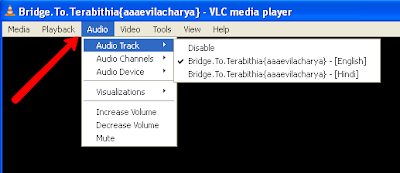
If you want to watch movies in english & hindi so you have to download VLC Media Player 
After Download vlc media player open your dual audio movie.
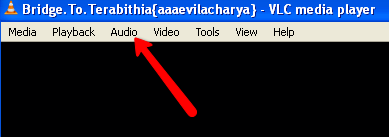
And do below pics.
vlc media player for dual audio movies
Vlc Media player for hd movies
Now enjoy your movies in dual audios
Remove autorun virus in simple ways
Sometime computer travels with autorun virus.Its hard to remove them today i will tell you how to remove autorun virus.its a 4mb software that help you to remove your autorun virus.
Click here to download