Showing posts with label Android Tricks. Show all posts
Cshare Application for mobile

CShare is a cool new app that enables you to transfer files between phones. You can now send or receive music, photos, videos, apps and games, and that too without any network, making it a zero-charge tool! Hurry up and download to experience a whole new way of connecting phones!

Features:

1. One-click identifying and sharing between devices
2. Free-of-cost file transfers between devices – no SIM, 2G/3G network required
3. Sharing speed 10x faster than 3G and 30x faster than Bluetooth
4. Transfer applications, videos, music and pictures between two or more Android devices
5. Approximately effective for up to 100m of distance

How to Spy on BBM Messages

1. Look For BBM Spy Software: In order to get into their BBM messages, you will need the help of specially designed software that can retrieve the desired data. However, there is a dearth of good programs that will specifically target the messaging service. Many apps will allow you to access phone conversations or call logs but not the actual messages exchanged in BBM chat. So when looking for software to use, make sure it specifies itself as a Blackberry Spy app.
2. Evaluate the Options: Once you find software that can access BBM messages, pick one that suits your needs the best. If you are unable to figure out any at all, then there are two good apps for starters that you can try. Spyera is a good option that solves many problems when it comes to spying. With this one you can access BBM conversations, emails, texts and even ongoing phone calls. You can also try MobiStealth spy software. Like Spyera you can use it to access BBM messages, videos and photos but not live calls. Both of them allow for the user to monitor the target BlackBerry remotely. With MobiStealth you can receive the data from an online dashboard or private email account.
3. Download and Install: Once you have decided on BBM spy software, you need to purchase it. In order for it to work it needs to be accessed from the target’s phone. That means you must physically retrieve the BlackBerry you wish to monitor and access the Internet. Stealth would be required on your side of course. After that you proceed to downloading it from the source site. Once download is complete, begin the installation process. Once the notification of installation completion appears, you can be sure that the spy software is successfully in place. Simply wait for conversations to take place and then monitor them!

How to unlock android phone after too many failed pattern attempts?

When will you face this critical situation?
  • Don’t know google credentials.
  • No Internet connections on your mobile phones.
SC20121223-122248

Follow these steps to pattern unlock your android phone after too many failed pattern attempts:
  1. Switch off your mobile
  2. Long press upper volume key, menu key and power key  at the same time.
samsung1    3. Now your Android phone shows ‘Android system Recovery’ Screen.
Photo0046

4. Here select ‘Wipe data/factory reset’ which is 3rd option using volume key and press menu button to go next level.
Photo0049

5. Select ‘Yes — delete all user’ which is 8th option again using the same keys.
2013-04-29_16-28-42_433

6. Now press on ‘Reboot Now’ option which is 1st option using Menu key.
2013-04-29_16-29-33_343

7. After rebooting your phone is UNLOCKED.

Steps to avoid DATA LOSS:
  • Register your android phone with any Google account or any Samsung account and sync your data.
  • Back-up your contact and other information in SD card frequently.
  • Keep away your phone from your kids.

Glass mobile phone

Creating Mobile Contacts from Paper Lists with Ringya

Ringya originally launched it's mobile contact management app of the same name on iOS back in January. Allowing users to create mobile contacts by taking a picture of a paper list, one that many probably have stuck on their fridge, is something that folks with Android can now do as well with the Ringya Android app release


Ringya works by putting contacts into contextual groups, say co-workers, friends, etc. and when someone calls displays this information on the phone to put the call in context. So if someone from your kids school calls, it will display that association along with the persons name, 'John Smith' - Jane Smith's Father, Fair Oaks Elementary School', for instance, instead of just 'John Smith'.
Putting contacts in context like this has several other advantages as well. You can send text messages just to your co-workers for instance, alerting them to a meeting, or to your kids school's parents list, letting them know of school events, or perhaps to find someone to pick your kid up if you're running late.
Speaking to Mashable, Ringya CEO Gal Nachum insightfully comments, "...We can share all sorts of assets — videos over YouTube, images over Instagram, but one of the fundamental elements are contacts."
The app has been described as a 'Dropbox for contacts', and offers the ability to share contact groups, or 'rings' as they are called in the app as well sync rings when they are updated, with everyone on the list automatically. The app is available for free on Google Play or for iOS in the Apple Store. The company has said through it's site that Blackberry and Windows phone versions could also be available at a later date although no details are available.

Sony Xperia Z

Price Rs. 30090

sony xperia z

Main Features: 5-inch Capacitive Touchscreen | Android 4.1.2 OS | 13MP Rear Camera | 1.5GHz Krait processor, 2GB RAM, Adreno 320 GPU | 16GB Internal Memory, Expandable up to 32GB | GPS, Wi-Fi, 3G
Sony Xperia Z Yuga features a 5-inch Capacitive Touchscreen along with a Display Resolution of 1080x1920 pixels bearing a Pixel Density of 441 ppi. The Yuga runs on Android 4.1.2 (Jelly Bean) OS which has been powered with Quad-core 1.5GHz Krait Processor, along with 2GB RAM and Adreno 320 GPU.
Sony Xperia Z “Yuga” packs along with itself a 13MP Camera on the Rear Side which exhibits LED Flash, Geo tagging, Autofocus and Image/Video Stabilisation Features. The Xperia Z houses within itself an Internal memory of 16GB along with the flexibility of External Memory expansion up to 32GB via Micro SD Card.
On the Connectivity front the Yuga includes 3G, Wi-Fi, GPS, USB and Bluetooth features. The Accelerometer, Proximity Sensor and Compass add to the uniqueness of the Gadget. Sony Xperia Z has been fueled up with a Non-removable Li-Ion Battery.

 Apple Iphone 5s 


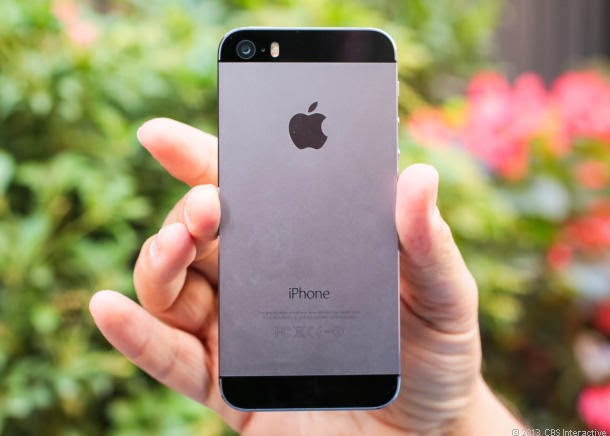
 The good: The iPhone 5S delivers an improved camera, a nifty fingerprint sensor, and a next-gen CPU and motion-tracking chip. Apple throws in the iWork app suite for free. iOS 7 adds some nice step-ups, too, including AirDrop file transfers and the Android-like Control Center.
The bad: External design is identical to that of the iPhone 5, including a 4-inch screen that looks downright tiny next to Android competitors. For now, the fingerprint sensor only works with Apple apps. The 64-bit A7 processor and M7 motion-tracking chip don't have killer apps yet. iOS 7 differences are potentially jarring for longtime iPhone users.
The bottom line: The iPhone 5S is not a required upgrade, but it's easily the fastest and most advanced Apple smartphone to date.
iphone 5s

apple iphone 5s

Android 4.4 Kitkat
The Nexus 5 should be the first smartphone to run Android 4.4 KitKat, Google's next OS iteration, out of the box. Google has already formalized the platform, but the details are a complete mystery. The fall time frame falls in line with previous platform releases; Android 4.0 came in October 2011, and Android 4.2 showed up in November 2012.

            How to Track Lost Android Phone

Lookout By Security and Antivirus

Lookout is the best android app for security and antivirus..
If you have activated the option “Missing Device” in this app, it is easy to find your device. If you have also enabled “Signal Flare” option, you can trace the last known location of your android device. This is helpful in case your phone battery is dead or tablet is switched off.
Now sign in Lookout to locate your device. The map shows the location of your phone. If you are at a short distance from the tablet, you can choose Scream option to make a loud noise to find it.

Android Device Manager

Google has released a new locator feature for Android gadgets called Android Device manager, which helps its users locate their lost or stolen phones and tablets. Here’s how to use Android Device Manager.
Go to the Google Settings app, then select Android device manager. By default the locator feature is activated but to activate remove data wipe, select the box next to “Allow remote factory reset”, then select “activate”.
To use this feature, open the site https://www.google.com/android/devicemanager and sign in to your Google account. You may be prompted for permission to allow Android Device Manager to use location data. Select the Accept tab to continue.
Now it's show a map that shows the location of your device along with other details such as the name of the place, when it was last used and more. The location data doesn’t help you if your phone is misplaced somewhere in your home. Instead of making a call to your phone using other’s phone, you can call your phone directly from Android Device Manager. This will make your device to ring with high volume for 5 minutes, even if it’s in silent or vibrate mode.
Apart from these, there are other apps such as Android Lost, Where do My Droid and GadgetTrak that help you in finding your lost Android phone/Tablet.